
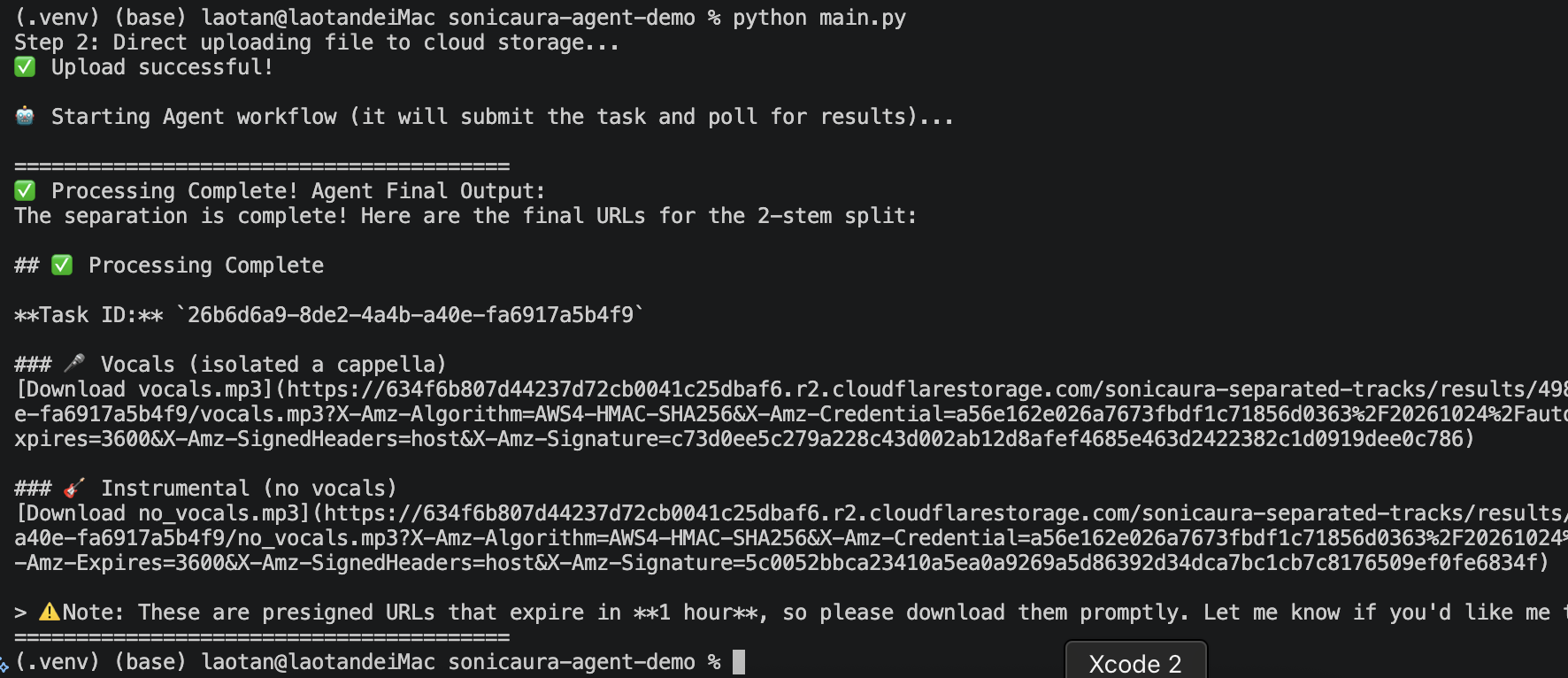
This repository demonstrates how to build a production-ready AI Agent that processes large audio files using the SonicAura MCP Server and the OpenAI Agents SDK.
Instead of relying on the LLM to guess complex parameters, this demo showcases a modern, Agent-Native Architecture with 1-to-1 semantic tools.
💡 Why this repo is special: Most LLM demos fail when you give them a file larger than 1MB because of context limits and JSON truncation. This repo demonstrates the Production-Ready Pattern:
- Direct Uploads: Python handles the heavy lifting (direct upload to Cloudflare R2 via presigned URLs).
- Atomic Tools: The server exposes precise tools (e.g.,
extract_vocals,split_4stems,export_midi). No more confusingtask_typeguesses.- Foolproof Polling: The Agent polls the status using only the
task_id, auto-detecting all generated tracks, MIDI, and chords without extra parameters.
- Native MCP Integration: Connects to SonicAura's remote MCP server via Streamable HTTP.
- Large File Support: Bypasses LLM context limits by using presigned URLs for direct uploads.
- Asynchronous Polling: Agents handle long-running tasks and poll for completion seamlessly.
- Framework Agnostic: Uses the OpenAI Agents SDK, but works perfectly with DeepSeek, OpenAI, or Claude.
- Resilient Design: Built-in
**kwargsto absorb LLM hallucinations and avoid infinite retry loops.
- Python 3.10 - 3.12 (Python 3.13+ is not recommended due to third-party library compatibility)
- An LLM API Key (OpenAI, or a compatible provider like DeepSeek)
- A SonicAura API Key (Get 2 free executions per month at SonicAura Studio)
# Clone the repo
git clone https://github.com/yourusername/sonicaura-agent-demo.git
cd sonicaura-agent-demo

# Create and activate virtual environment
python -m venv .venv
source .venv/bin/activate  # On Windows use: .venv\Scripts\activate

# Install dependencies
pip install -r requirements.txtCreate a .env file in the root directory and add your API keys:
OPENAI_API_KEY=your_deepseek_or_openai_key_here
SONICAURA_API_KEY=your_sonicaura_key_hereEnsure you have a test audio file at ./samples/noisy_audio.mp3. Then, run:
python main.pyBecause the MCP server is designed for AI, the prompt is completely natural language. You don't need to hardcode JSON parameters:
prompt = f"""
The audio file has been successfully uploaded. The source_key is: '{file_key}'

Please extract the vocals (2 stems) from this audio file.
Poll the status until it is done.
Return the download URLs for BOTH the isolated vocals and the instrumental (no_vocals).
"""

result = await Runner.run(podcast_agent, prompt, max_turns=30)- The LLM reads the prompt and selects the
extract_vocalstool. - The Server returns a
task_id. - The LLM calls
check_task_statuswith thetask_id. The server politely waits a few seconds, then scans the cloud storage. - The Result is returned dynamically: the Agent gets the presigned URLs for
vocals.mp3andno_vocals.mp3without ever needing to pass file-specific flags.
The server exposes the following exact tools to the Agent:
File Transfer
get_upload_url: Get a presigned URL for large file uploads.
Audio Processing (1:1 UI mapping)
extract_vocals: Isolate vocals and instrumental (2 stems).split_4stems: Split into vocals, drums, bass, other.split_6stems: Split into vocals, guitar, piano, bass, drums, other.extract_single_instrument: Quick splitter for any isolated instrument.extract_chords: Detect chord progression from the track.export_midi: Convert an isolated instrument into an editable MIDI file.denoise_audio: Remove background noise (speech or music).apply_reverb: Add spatial reverb effects.
Utilities
check_task_status: Poll task completion (requires onlytask_id).list_audio_tools: List all available capabilities.get_my_credits: Check remaining API credits.check_service_status: Check server health.