
🧠 Brain Framework: from information to informed actions.
Brain Framework (BF) is a local-first brain for you and your AI agents. It collects evidence from your tools into plain files you own, connects them through an explicit ontology, lets any agent harness search and read offline, and wakes your harness when declarative when: rules or reviewed gates spot new evidence.
- Plain files you own, open to any agent. Markdown notes (
projects/,concepts/,actions/) and JSON records (memories/), reached through thebfCLI, MCP, Agent Skills andAGENTS.md. - Explicit graph and provenance.
bf.yamlmaps provider fields into shared relations once at collection. Every claim keeps its source record, andnewer_evidenceflags notes when upstream evidence changes. - Controlled autonomy. Built-in
when:gates (sources,review,actions,attention) wake your harness offline with zero wasted model runs, andpropose: truelets read-only assistants draft validatedACTION.mdproposals.


Try it · How it works · Agents · Your tools · Proactive agents · Boundaries · Documentation
Requires Linux or macOS and uv — no model or cloud account needed:
uv tool install --python 3.14 brain-framework
bf init ~/brain && cd ~/brain
Save projects/new-website.md:
---
type: project
status: draft
updated: 2026-11-01
summary: Launch a product website that helps visitors understand the product.
---

# New website

## Decision

Start with a single product page because visitors need a clear explanation before signing up.

## Next actions

- [ ] Draft the product page.
Search and read the exact section:
bf search "visitors clear explanation"
bf read projects/new-website.md#decision
bf validate && bf eval
Continue with Getting started or the four-tool walkthrough across Workspace, Jira, GitHub and Google Cloud fixtures.
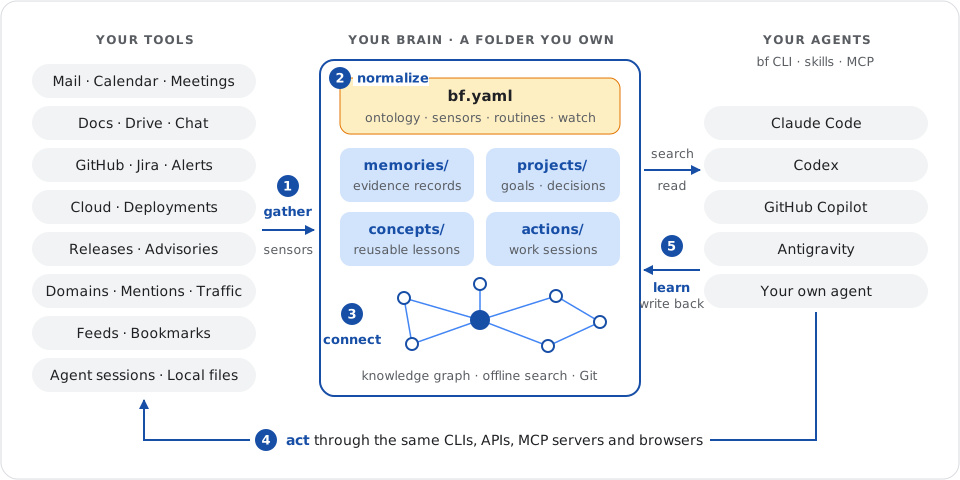
Five steps run in one loop: gather → normalize → organize and connect → act → learn.
| Folder | Role |
|---|---|
memories/ |
Collected JSON records keyed by SHA-256 of id, with provenance and fields |
projects/ |
Project state (Now), decisions (Decision) and open tasks (Next actions) |
concepts/ |
Durable reusable patterns and reference syntheses |
actions/ |
Tracked work sessions (draft open, stable settled, deprecated retired) |
sensors/ |
Stdlib scripts (built on _sensor.py) printing JSON or JSONL from your tools |
routines/ |
Deterministic scripts (built on _bf.py) run on intervals, at or Git hooks |
bf.yaml declares shared fields and mappings, sensors, routines and assistants. A disposable SQLite cache in .bf/ powers offline BM25 search, graph backlinks (bf read project:new-website), triage (bf read review) and JSONL exports (bf export --kind items). See the directory reference.
Install the packaged skills for Claude Code, Codex, GitHub Copilot or any Agent Skills host:
bf skills ~/.agents/skills        # global host discovery (~/.claude/skills for Claude Code)
bf skills skills --link # inside a brain: links .agents/skills and .claude/skillsbf-use: orient withbf read review, verify and citeSOURCE:IDrefs, update owning notes and compile new evidence intoprojects/andconcepts/.bf-action: start, resume, hand off and settle tracked work sessions (bf action new,bf action status).bf-setup: create a brain, connect CLI or MCP access, discover sources and import vaults.bf-maintain: add sensors/routines/assistants, runbf watch, recover queues and resolve Git conflicts.
See agent workflows and optional repository hooks.
Copy a reviewed stdlib sensor into sensors/ alongside _sensor.py: local documents, highlights, Git history, GitHub history, Google Calendar, Gmail headers, Drive folders, or any source you can script. Keep them fresh in a terminal or background service with bf watch (offline demo):
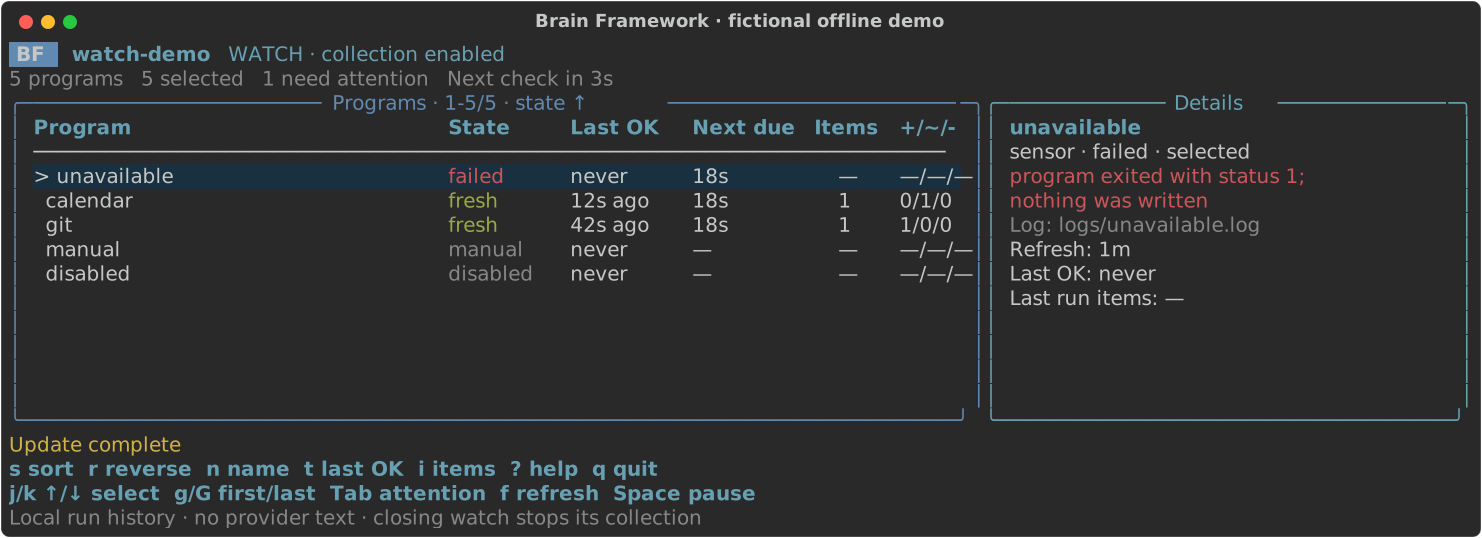
An assistant watches your brain offline and invokes your harness only when when: matches:
assistants:
  triage:
    prompt: prompts/triage.md
    command:
      [
        claude,
        --print,
        --output-format,
        json,
        --json-schema,
        "{{schema}}",
        --tools,
        "Read,Grep,Glob,Bash",
        --allowedTools,
        "Bash(bf read *),Bash(bf search *)",
        --permission-mode,
        dontAsk,
      ]
    reply: { path: /structured_output }
    propose: true
    post: desktop
    schedules:
      mail: { every: 600, when: { sources: [mail] } }
when: checks SQLite with zero subprocesses, passes new events to your harness, posts replies to your channel and saves validated draft ACTION.md proposals when propose: true. See safe prompts and propose, then act.
- Local-first and private. No BF server, account or telemetry; retrieval is 100% offline (privacy and security).
- Harnesses reason; BF verifies. BF runs no LLM and ships no provider SDKs or embeddings (
bf export --kind itemsfeeds external retrievers; what BF does not do). - Git-native collaboration. Version notes and programs in Git and federate team brains with
brains:; major releases batch breaking changes cleanly (versioning).
Commands · Issues · Contribute · Governance · MIT License · Third-party notices